Моя хоумлаба (готовый compose)

Всем привет, хочу поделиться своей хоумлабой и всем что я самохосчу в удобном формате compose файла, чтобы тем, кому лень собирать свой compose, воспользовались моим.
Я сам еще новичек, так что критика приветствуется.
И так начнем…

Железо:

- мини пк szbox z58

  1. ryzen 7 5800H
  2. 64gb ddr4
  3. SSD nvme 1tb - для proxmox и lxc/vm
  4. 2tb HDD toshiba - хранилище

64гб оперативы хорошо, но думаю 32/48 всем хватит, такое количество оперативы бывает полезно при перекидывании файлов на nas или immich/photoprism, но у меня все в icloud, так что мне и 48 хватило бы

- роутер xiaomi ax3000t на openwrt
- док/кейс для hdd
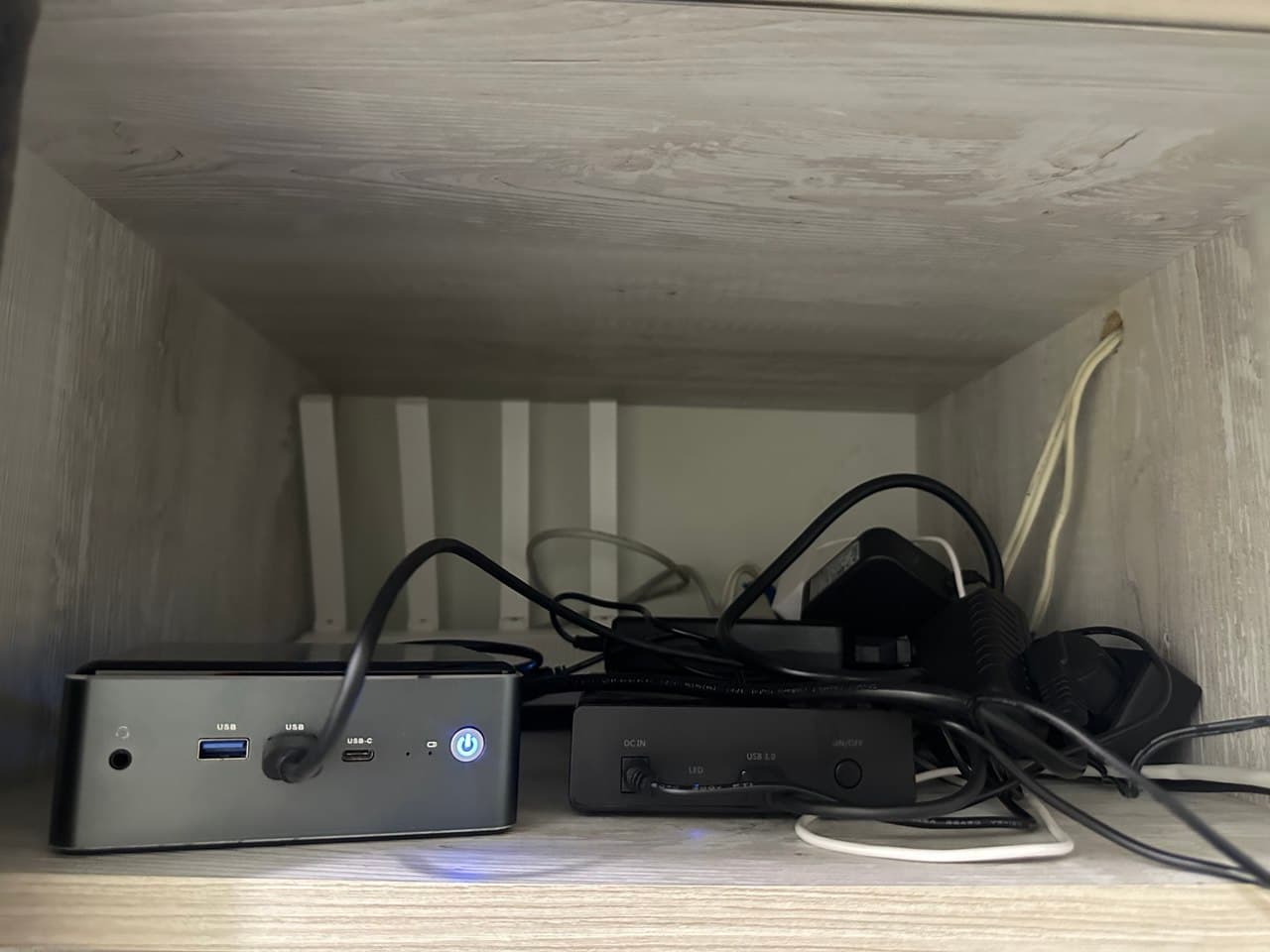
Прежде всего сеть:

Сеть

ax3000t подключен как бридж от роутера провайдера.
на серваке развернут technitium как dns.server+adblocker.
Роутер выдает ip technitium, каждому устройству т.к. я не захотел разбираться как сделать кастомный multidns в самом openwrt.
Как реверс прокси у меня прекрасный traefik(далее в compose).
Итого: устройство подключается к сети, получает днс technitium, все запросы к домену внутри сети адресуются к домену в докер-машине, минуя внешнюю сеть.
А также в proxmox прописан technitium отдельно.
Для “защиты” стоит sso tinyauth, мне хватает, ставится в 1 клик, работает через labels в compose как и traefik, ничего больше настраивать не надо. Но для серьезной защиты малофункционален
Crowdsec не стоит, ибо смысла особо не вижу, хоумлаба закрыта за CG-NAT, а всё что из внешней сети стоит за cloudflared с аутентификацией через google(не совет, по crowdsec смотрите сами, что вам нужно)

Почему не dnsforward внутри openwrt?

  1. Некоторые запросы утекают во внешнюю сеть по неведомой мне причине.
  2. В ax3000t мало внутренней памяти, чтобы развернуть adguard home со всеми блоклистами.

Почему technitium, а не adguard home?
Лично мой выбор, мне он показался более гибким, удобным и понятным, хоть и интерфейс весьма топорный.

По сети вроде все, двигаемся дальше…

Proxmox

HDD в proxmox прокинут как zfspool из одного диска.
Зачем? Не знаю, делал все по гайду англоязычного ютубера, без понятия насколько данное решение верно, но все работает чудесно.

В качестве альтернативы portainer у меня komodo, мне он нравится больше + удобно подключать и рулить доп. машинами.

Arca- arr/медиа стэк, основная докер-машина

balda - вторая докер-машина, в ней сервисы которые можно не бэкапить и всякий мусор

docktest - тестовая машина с докером, если хочется поиграться со всяким разным

webmin-vm, mongodb, redis - дб и тд
кстати доступ к дб у меня через прокинутые порты в traefik. Так делать, насколько я знаю, очень плохо, но я не хочу запоминать их ip и вообще отстаньте я так хочу

netbird - zerotrust, раньше использовал, но т.к. надо устанавливать клиенты, отказался, не удобно по мне, но иногда если нужно оказаться именно внутри сети, включаю

pulse - берет данные по мониторингу с proxmox, просто вкладка с мониторингом прокса в отдельном месте

ssm - squirrel servers manager, новый сервис по мониторингу и менеджменту, пока сырой, поставил поиграться

technitium - dns сервер, см. выше

immich - не пользуюсь, т.к. есть icloud+
crafty - майнкрафт сервер, в игры не играю, поставил на будущее, если будет желание

pelican-panel+mumble - панель для запуска разного рода серверов для игр и машина которой эта панель управляет

beszel - мониторинг, не пользуюсь, не удалил, потому, что… сейчас удалю :sweat_smile:

cloudflared - туннель, по мне самое удобное решение для удаленного доступа. Zero-Trust лучше конечно во много, тот же pangolin, но я выбрал данное решение

heroku - userbot для telegram

gpu - вм в которую прокинут ryzen igpu, планировалась как вм для стриминга простеньких игр и нейросетей. Нет возможности проводного подключения, так что играть не сильно приятно. А нейросеть локально лично мне не слишком полезна, хоть и скорость на встройке оказалась очень даже терпима(8b моделей)

owncloud - название говорит за себя, не nextcloud, так как там много всего что мне не надо, что делает его излишним + непросто настроить чтобы все работало как надо, получилось завести только onlyoffice

win - windows-машина, у меня только macbook air 2015 на arch, так что часто нужна windows машина для всякого разного

фухх, с proxmox закончили, дальше больше :smiling_face_with_tear:

Dashboard

В качестве дашборда у меня homepage

Imgur: The magic of the Internet

Dashboard - конфиг к моему compose
- main:
    - proxmox:
        icon: proxmox.png
        href: https://proxmox.domain.ru
        showName: false
        widget:
            type: proxmox
            url: https://192.168.1.100:8006
            username: #юзернейм формата см доки - homepage@pam!homepage
            password: # токен формата см доки - 72971443-d410-45kk-95b0-c27k6172a8a4
#  node: pve-1 # optional
#        description: Proxmox VE
    - komodo:
        icon: komodo.svg
        href: https://komodo.domain.ru
#        description: Proxmox VE
        widget:
            type: komodo
            url: http://192.168.1.111:9120/
            key:
            secret:
            showSummary: true # optional, default: false
            showStacks: true # optional, default: false

    - traefik:
        icon: traefik.svg
        href: https://traefik.domain.ru
        widget:
            type: traefik
            url: https://traefik.domain.ru
#        description: Proxmox VE

    - openwrt:
        icon: openwrt.svg
        href: http://openwrt.lan
#        description: Proxmox VE
        widget:
            type: openwrt
            url: http://192.168.1.1
            username: root
            password:
#            interfaceName: eth0 # optional


    - quantum:
        icon: filebrowser-quantum.png
        href: https://arrfiles.domain.ru

    - balda:
        icon: filebrowser-quantum.png
        href: https://baldafiles.domain.ru

    - webmin:
        icon: webmin.svg
        href: https://webmin.domain.ru/

    - vscode:
        icon: code.svg
        href: https://vscode.domain.ru/

    - nexterm:
        icon: nexterm.svg
        href: https://nexterm.domain.ru/

- arr:
    - flood:
        icon: flood.svg
        href: https://flood.domain.ru/
        widget:
            type: flood
            url: https://flood.domain.ru/
            username:  # if set
            password:

    - jellyfin:
        icon: jellyfin.svg
        href: https://jellyfin.domain.ru/
        widget:
            type: jellyfin
            url: https://jellyfin.domain.ru/
            key:
            enableBlocks: true # optional, defaults to false
            enableNowPlaying: false # optional, defaults to true
            enableUser: true # optional, defaults to false
            enableMediaControl: true # optional, defaults to true
            showEpisodeNumber: true # optional, defaults to false
            expandOneStreamToTwoRows: false

    - jellyseerr:
        icon: jellyseerr.svg
        href: https://jellyseerr.domain.ru/
        widget:
            type: jellyseerr
            url: https://jellyseerr.domain.ru/
            key:

    - prowlarr:
        icon: prowlarr.svg
        href: https://prowlarr.domain.ru/
        widget:
            type: prowlarr
            url: http://192.168.1.111:9696/
            key:

    - radarr:
        icon: radarr.svg
        href: https://radarr.domain.ru/
        widget:
            type: radarr
            url: http://192.168.1.111:7878/
            key:

    - sonarr:
        icon: sonarr.svg
        href: https://sonarr.domain.ru/
        widget:
            type: sonarr
            url: http://192.168.1.111:8989/
            key:

    - lidarr:
        icon: lidarr.svg
        href: https://lidarr.domain.ru/
        widget:
            type: lidarr
            url: http://192.168.1.111:8686/
            key:

    - readarr:
        icon: readarr.svg
        href: https://readarr.domain.ru/
        widget:
            type: readarr
            url: http://192.168.1.111:8787/
            key:

    - kavita:
        icon: kavita.svg
        href: https://kavita.domain.ru/
        widget:
            type: kavita
            url: http://192.168.1.111:5021
#            username:
#            password: password
            key:  # Optional, e.g. if not using username and password


    - qbit:
        icon: qbittorrent.svg
        href: https://qbit.domain.ru/

    - watcharr:
        icon: watcharr.svg
        href: https://watcharr.domain.ru/

    - pinchflat:
        icon: pinchflat.png
        href: https://pinch.domain.ru/

    - metube:
        icon: metube.svg
        href: https://metube.domain.ru/

    - slskd:
        icon: slskd.svg
        href: https://slskd.domain.ru/

    - nicotine:
        icon: nicotine-plus.svg
        href: https://nicotine.domain.ru/

- monitoring:
    - Uptime-kuma:
        icon: uptime-kuma.svg
        href: https://kuma.domain.ru/
        widget:
          type: uptimekuma
          url: http://192.168.1.111:3001
          slug: dash

    - beszel:
        icon: beszel.svg
        href: https://beszel.domain.ru/
        widget:
          type: beszel
          url: http://192.168.1.159:8090
          username:  # email
          password:
#          systemId: systemId # optional
          version: 2 # optional, default is 1
    - homelaba:
        icon: grafana.svg
        href: https://grafana.domain.ru/d/homelaba/
    - traefik:
        icon: grafana.svg
        href: https://grafana.domain.ru/d/traefik
#         widget:
#             type: grafana
#             version: 2 # optional, default is 1
# #            alerts: alertmanager # optional, default is grafana
#             url: https://grafana.domain.ru
#             username:
#             password:

    - gotify:
        icon: gotify.svg
        href: https://gotify.domain.ru
        # widget:
        #     type: gotify
        #     url: http://192.168.1.111:8030
        #     key:
    - dozzle:
        icon: dozzle.svg
        href: https://dozzle.domain.ru/

    - pulse:
        icon: pulse.svg
        href: https://pulse.domain.ru/

    - portracker:
        icon: portracker.svg
        href: https://portracker.domain.ru/

    - lan:
        icon: watchyourlan.png
        href: https://lan.domain.ru/

    - speedtest:
        icon: openspeedtest.svg
        href: https://speedtest.domain.ru/

- misc:
    - vaultwarden:
        icon: vaultwarden.svg
        href: https://vaultwarden.domain.ru/
    - technitium:
        icon: technitium.png
        href: https://dns.domain.ru/
    - navidrome:
        icon: navidrome.svg
        href: https://navidrome.domain.ru/
    - romm:
        icon: romm.svg
        href: https://romm.domain.ru/
    - aria:
        icon: ariang.png
        href: https://aria.domain.ru
    - neko:
        icon: neko-light.svg
        href: https://neko.domain.ru/
    - pingvin:
        icon: pingvin.svg
        href: https://pingvin.domain.ru/

Все остальное во 2 части, так как форум не дает писать больше 30к символов

4 лайка

продожение
ВНИМАНИЕ!!!

все данные меняем на свои user:pass apikey ip и тд

И

в .env для каждого стэка

TZ=ваш таймзон, пример: etc/UTC
domain=ваш домен, пример domain.ru
compose - Arr

Arr stack - Pastebin.com

compose - Traefik

обязательно смотрите гайды, например у prohomelab/stilicho2011
compose.yaml

services:
  traefik:
    image: traefik:latest # Use the latest Traefik image
    container_name: traefik # Name of the container
    restart: unless-stopped # Ensures the container restarts if it stops unexpectedly
    command:
      - --entrypoints.web.address=:80
      - --entrypoints.websecure.address=:443
      - --entrypoints.postgres.address=:5432
      - --log.level=DEBUG
      - --accesslog=true
    security_opt:
      - no-new-privileges:true # Prevents the container from gaining additional privileges
    networks:
      - proxy # Connects to the predefined external network named 'proxy'
    ports:
      - 80:80 # HTTP port
      - 443:443 # HTTPS port
      - 55432:55432 #postgres
      - 3307:3307 #maria
      - 27016:27016 #mongo
      - 6380:6380 #redis
      - 8888:8888 #metrics
    environment:
      - CF_API_EMAIL= # Cloudflare account email for API access
      - CF_DNS_API_TOKEN= # Cloudflare DNS API token
      # - CF_API_KEY=YOU_API_KEY
      # - VULTR_API_KEY=YOU_API_KEY
    volumes:
      - /etc/localtime:/etc/localtime:ro # Sync time with the host
      - /var/run/docker.sock:/var/run/docker.sock:ro # Allows Traefik to interact with Docker
      - /home/docker/traefik/traefik.yaml:/traefik.yaml:ro # Traefik configuration file
      - /home/docker/traefik/acme.json:/acme.json # SSL certificate file
      - /home/docker/traefik/config.yaml:/config.yaml:ro # Additional configuration file
      - /home/docker/traefik/logs:/var/log/traefik # Log directory
    labels:
      - "traefik.enable=true" # Enable Traefik on this service
      - "traefik.http.routers.traefik.entrypoints=http" # Define HTTP entrypoint
      - "traefik.http.routers.traefik.rule=Host(`traefik.${domain}`)" # Host rule for routing
#      - "traefik.http.middlewares.traefik-auth.basicauth.users=Anchel:$$2y$$05$$GRm6cZXhGPl.HNyTrH//vOTsBU.bz/JvLh6Yae7oON4HPRRTNZ1ye" # Basic auth for security traefik for username/pass
      - "traefik.http.middlewares.traefik-https-redirect.redirectscheme.scheme=https" # Redirect HTTP to HTTPS
      - "traefik.http.middlewares.sslheader.headers.customrequestheaders.X-Forwarded-Proto=https" # Set forwarded headers for SSL
      - "traefik.http.routers.traefik.middlewares=traefik-https-redirect" # Apply HTTPS redirect middleware
      - "traefik.http.routers.traefik-secure.entrypoints=https" # Secure entrypoint for HTTPS
      - "traefik.http.routers.traefik-secure.rule=Host(`traefik.${domain}`)"  # Host rule for secure routing
#      - "traefik.http.routers.traefik-secure.middlewares=traefik-auth" # Apply authentication middleware
      - "traefik.http.routers.traefik-secure.tls=true" # Enable TLS for secure connection
      - "traefik.http.routers.traefik-secure.tls.certresolver=cloudflare" # Use Cloudflare for SSL certificate resolution
      # - "traefik.http.routers.traefik-secure.tls.certresolver=vultr"
      - "traefik.http.routers.traefik-secure.tls.domains[0].main=${domain}" # Main domain for SSL certificate
      - "traefik.http.routers.traefik-secure.tls.domains[0].sans=*.${domain}" # SANs for SSL certificate
      - "traefik.http.routers.traefik-secure.service=api@internal" # Internal service for Traefik API
#      - "traefik.http.routers.traefik-secure.middlewares=authelia@file"


  tinyauth:
    image: ghcr.io/steveiliop56/tinyauth:v3
    container_name: tinyauth
    restart: unless-stopped
    environment:
      # generate with openssl rand -base64 32 | tr -dc 'a-zA-Z0-9' | head -c 32
      - SECRET=
      - APP_URL=https://auth.${domain}
      # generate with "echo $(htpasswd -nB user) | sed -e s/\\$/\\$\\$/g" - substitute the user with what you want, or use a file
      #- USERS= см гайды
      - USERS_FILE=users_file # add a file with multiple users in the above format if necessary
      - LOG_LEVEL=0
    volumes:
      - /etc/localtime:/etc/localtime:ro
      - /home/docker/tinyauth/users:/tinyauth/users_file # в этом файле указать всех юзеров user:xxx |  echo $(htpasswd -nB user) | sed -e s/\\$/\\$\\$/g d написать в терминал(вместо user ваш логин) он выдаст user:xxx это вставить в файл users без расширения
    networks:
      - proxy
    labels:
      - "traefik.enable=true"
      - "traefik.docker.network=proxy"
      - "traefik.http.routers.tinyauth.entrypoints=http"
      - "traefik.http.routers.tinyauth.rule=Host(`auth.${domain}`)"
      - "traefik.http.middlewares.tinyauth-https-redirect.redirectscheme.scheme=https"
      - "traefik.http.routers.tinyauth.middlewares=tinyauth-https-redirect"
      - "traefik.http.routers.tinyauth-secure.entrypoints=https"
      - "traefik.http.routers.tinyauth-secure.rule=Host(`auth.${domain}`)"
      - "traefik.http.routers.tinyauth-secure.tls=true"
      - "traefik.http.routers.tinyauth-secure.tls.certresolver=cloudflare"
      - "traefik.http.routers.tinyauth-secure.service=tinyauth"
      - "traefik.http.services.tinyauth.loadbalancer.server.port=3000"
      - "traefik.http.middlewares.tinyauth.forwardauth.address=http://tinyauth:3000/api/auth/traefik"


networks:
  proxy:
    external: true
    name: proxy

config.yaml в /home/docker/traefik/config.yaml
domain.ru заменить на свое

http:
 #region routers
  routers:
    proxmox:
      entryPoints:
        - "https"
      rule: "Host(`proxmox.domain.ru`)"        # Change DOMAIN_NAME to yours
      middlewares:
        - default-headers
        - https-redirect
      tls: {}
      service: proxmox

    komodo:
      entryPoints:
        - "https"
      rule: "Host(`komodo.domain.ru`)"
      middlewares:
        - default-headers
        - https-redirect
      tls: {}
      service: komodo

    dash:
      entryPoints:
        - "https"
      rule: "Host(`dash.domain.ru`)"
      tls: {}
      service: dash

    nextcloud:
      entrypoints:
        - "https"
      rule: "Host(`nextcloud.domain.ru`)"
      middlewares:
        - https-redirect
        - nextcloud-secure-headers
      tls: {}
      service: nextcloud

    beszel:
      entryPoints:
        - "https"
      rule: "Host(`beszel.domain.ru`)"
      middlewares:
        - default-headers
        - https-redirect
      tls: {}
      service: beszel

    pulse:
      entryPoints:
        - "https"
      rule: "Host(`pulse.domain.ru`)"
      middlewares:
        - default-headers
        - https-redirect
        - tinyauth@docker
      tls: {}
      service: pulse

    lan:
      entryPoints:
        - "https"
      rule: "Host(`lan.domain.ru`)"
      middlewares:
        - default-headers
        - https-redirect
      tls: {}
      service: lan

    runtipi:
      entryPoints:
        - "https"
      rule: "Host(`runtipi.domain.ru`)"
      middlewares:
        - default-headers
        - https-redirect
      tls: {}
      service: runtipi

    qbit:
      entryPoints:
        - "https"
      rule: "Host(`qbit.domain.ru`)"
      tls: {}
      service: qbit

    aria:
      entryPoints:
        - "https"
      rule: "Host(`aria.domain.ru`)"
      middlewares:
        - default-headers
        - tinyauth@docker
      tls: {}
      service: aria

    aria-serv:
      entryPoints:
        - "https"
      rule: "Host(`aria-serv.domain.ru`)"
      middlewares:
        - default-headers
      tls: {}
      service: aria-serv

    vaultwarden:
      entryPoints:
        - "https"
      rule: "Host(`vaultwarden.domain.ru`)"
      middlewares:
        - default-headers
        - https-redirect
      tls: {}
      service: vaultwarden

    kavita:
      entryPoints:
        - "https"
      rule: "Host(`kavita.domain.ru`)"
      middlewares:
        - default-headers
        - https-redirect
        - tinyauth@docker
      tls: {}
      service: kavita

    romm:
      entryPoints:
        - "https"
      rule: "Host(`romm.domain.ru`)"
      middlewares:
        - default-headers
        - https-redirect
        - tinyauth@docker
      tls: {}
      service: romm

    # movary:
    #   entryPoints:
    #     - "https"
    #   rule: "Host(`movary.domain.ru`)"
    #   tls: {}
    #   service: movary

    pingvin:
      entryPoints:
        - "https"
      rule: "Host(`pingvin.domain.ru`)"
      tls: {}
      service: pingvin

    autobrr:
      entryPoints:
        - "https"
      rule: "Host(`autobrr.domain.ru`)"
      middlewares:
        - default-headers
        - https-redirect
      tls: {}
      service: autobrr

    neko:
      entryPoints:
        - "https"
      rule: "Host(`neko.domain.ru`)"
      tls: {}
      service: neko

    #DataBases

    webmin:
      entryPoints:
        - "https"
      rule: "Host(`webmin.domain.ru`)"
      tls: {}
      service: webmin
    # jellyseer:
    #   entryPoints:
    #     - "https"
    #   rule: "Host(`jellyseer.domain.ru`)"
    #   middlewares:
    #     - authelia
    #   tls: {}
    #   service: jellyseer

    openwrt:
      entryPoints:
        - "https"
      rule: "Host(`openwrt.domain.ru`)"
      middlewares:
        - default-headers
        - https-redirect
        - tinyauth@docker
      tls: {}
      service: openwrt

    dns:
      entryPoints:
        - "https"
      rule: "Host(`dns.domain.ru`)"
      middlewares:
        - default-headers
        - https-redirect
      tls: {}
      service: dns


    owncloud:
      entryPoints:
        - "https"
      rule: "Host(`owncloud.domain.ru`)"
      middlewares:
        - default-headers
        - https-redirect
      tls: {}
      service: owncloud

    ssm:
      entryPoints:
        - "https"
      rule: "Host(`ssm.domain.ru`)"
      middlewares:
        - default-headers
        - https-redirect
      tls: {}
      service: ssm


#region services

  services:
    proxmox:
      loadBalancer:
        servers:
          - url: "https://192.168.1.100:8006"            # Change IP Address to your proxmox instance
        passHostHeader: true

    komodo:
      loadBalancer:
        servers:
          - url: "http://192.168.1.111:9120"
        passHostHeader: true

    dash:
      loadBalancer:
        servers:
          - url: "http://192.168.1.111:3130"
        passHostHeader: true

    nextcloud:
      loadBalancer:
        servers:
          - url: "https://192.168.1.161:443"
        passHostHeader: true

    beszel:
      loadBalancer:
        servers:
          - url: "http://192.168.1.159:8090"
        passHostHeader: true

    pulse:
      loadBalancer:
        servers:
          - url: "http://192.168.1.204:7655"
        passHostHeader: true

    lan:
      loadBalancer:
        servers:
          - url: "http://192.168.1.54:8840/"
        passHostHeader: true

    runtipi:
      loadBalancer:
        servers:
          - url: "http://192.168.1.54:80"
        passHostHeader: true

    qbit:
      loadBalancer:
        servers:
          - url: "http://192.168.1.111:8080"
        passHostHeader: true

    aria:
      loadBalancer:
        servers:
          - url: "http://192.168.1.111:6880"
        passHostHeader: true

    aria-serv:
      loadBalancer:
        servers:
          - url: "http://192.168.1.111:6800"
        passHostHeader: true

    vaultwarden:
      loadBalancer:
        servers:
          - url: "http://192.168.1.111:8011"
        passHostHeader: true

    kavita:
      loadBalancer:
        servers:
          - url: "http://192.168.1.111:5021/login?apiKey=7c8001a6-39b4-4bb5-bf0b-ed5380b54b86"
        passHostHeader: true

    # jellyseer:
    #   loadBalancer:
    #     servers:
    #       - url: "http://192.168.1.111:5055"
    #     passHostHeader: true

    romm:
      loadBalancer:
        servers:
          - url: "http://192.168.1.54:8178"
        passHostHeader: true

    # movary:
    #   loadBalancer:
    #     servers:
    #       - url: "http://192.168.1.54:8155"
    #     passHostHeader: true

    pingvin:
      loadBalancer:
        servers:
          - url: "http://192.168.1.54:8654"
        passHostHeader: true


    autobrr:
      loadBalancer:
        servers:
          - url: "http://192.168.1.111:7474"
        passHostHeader: true

    neko:
      loadBalancer:
        servers:
          - url: "http://192.168.1.254:8080/"
        passHostHeader: true

    openwrt:
      loadBalancer:
        servers:
          - url: "http://192.168.1.1/"
        passHostHeader: true

    dns:
      loadBalancer:
        servers:
          - url: "http://192.168.1.174:5380"
        passHostHeader: true

    owncloud:
      loadBalancer:
        servers:
          - url: "https://192.168.1.144"
        passHostHeader: true

    ssm:
      loadBalancer:
        servers:
          - url: "http://192.168.1.101:80/"
        passHostHeader: true

  #DataBases

    webmin:
      loadBalancer:
        servers:
          - url: "https://192.168.1.202:12321"
        passHostHeader: true


  middlewares:

    https-redirect:
      redirectScheme:
        scheme: https
        permanent: true

    # authelia:
    #   forwardAuth:
    #     address: "http://authelia:9091/api/verify?rd=https://auth.domain.ru"
    #     trustForwardHeader: true
    #     authResponseHeaders:
    #       - Remote-User
    #       - Remote-Groups
    #       - Remote-Name
    #       - Remote-Email

    # tinyauth:
    #   forwardAuth:
    #     address: "http://tinyauth:3000/api/auth/traefik"
    #     trustForwardHeader: true
    #     authResponseHeaders:
    #       - Remote-User
    #       - Remote-Groups
    #       - Remote-Name
    #       - Remote-Email


    default-headers:
      headers:
        frameDeny: true
        browserXssFilter: true
        contentTypeNosniff: true
        forceSTSHeader: true
        stsIncludeSubdomains: true
        stsPreload: true
        stsSeconds: 15552000
        customFrameOptionsValue: SAMEORIGIN
        customRequestHeaders:
          X-Forwarded-Proto: https

    default-whitelist:
      ipAllowList:
        sourceRange:
        - "10.0.0.0/8"
        - "192.168.0.0/16"
        - "172.16.0.0/12"

    secured:
      chain:
        middlewares:
        - default-whitelist
        - default-headers

    nextcloud-secure-headers:
      headers:
        hostsProxyHeaders:
          - "X-Forwarded-Host"
        referrerPolicy: "same-origin"
        customResponseHeaders:
          X-Robots-Tag: "none"

#    nextcloud-secure-headers:
#      headers:
#        hostsProxyHeaders:
#          - "X-Forwarded-Host"
#        referrerPolicy: "same-origin"
#        customResponseHeaders:
#          X-Robots-Tag: "noindex, nofollow"

#    nextcloud-chain:
#      chain:
#        middlewares:
#          # - ... (e.g. rate limiting middleware)
#          - https-redirect
#          - nextcloud-secure-headers
#          - default-headers
tcp:
  routers:
    postgres-router:
      entryPoints:
        - postgres
      rule: "HostSNI(`*`)"    # принимать все подключения на 5432
      service: postgres-service

    maria-router:
      entryPoints:
        - maria
      rule: "HostSNI(`*`)"    # принимать все подключения на 5432
      service: maria-service

    redis-router:
      entryPoints:
        - redis
      rule: "HostSNI(`*`)"
      tls: true
      service: redis-service

    mongo-router:
      entryPoints:
        - mongo
      rule: "HostSNI(`*`)"
      service: mongo-service

  services:
    postgres-service:
      loadBalancer:
        servers:
          - address: "192.168.1.202:55432"

    maria-service:
      loadBalancer:
        servers:
          - address: "192.168.1.202:3307"

    mongo-service:
      loadBalancer:
        servers:
          - address: "192.168.1.207:27016"

    redis-service:
      loadBalancer:
        servers:
          - address: "192.168.1.128:6380"


tls:
  options:
    default:
      alpnProtocols:
        - http/1.1
        - h2
        - postgres

traefik.yaml в /home/docker/traefik/traefik.yaml

api:
  dashboard: true
  debug: true
entryPoints:
  http:
    address: ":80"
    http:
      redirections:
        entryPoint:
          to: https
          scheme: https
  https:
    address: ":443"
  postgres:
    address: ":55432"
  maria:
    address: ":3307"
  redis:
    address: ":6380"
  mongo:
    address: ":27016"
  metrics:
    address: ":8888"

serversTransport:
  insecureSkipVerify: true
providers:
  docker:
    endpoint: "unix:///var/run/docker.sock"
    exposedByDefault: false
  file:
    filename: /config.yaml
    watch: true
certificatesResolvers:
  cloudflare:
    acme:
      email: #add your email
      storage: acme.json
      dnsChallenge:
        provider: cloudflare
        # provider: vultr
        resolvers:
          - "1.1.1.1:53"
          - "1.0.0.1:53"

log:
  level: "INFO"
  filePath: "/var/log/traefik/traefik.log"
accessLog:
  filePath: "/var/log/traefik/access.log"
metrics:
  prometheus:
    entryPoint: metrics
    addEntryPointsLabels: true
    addServicesLabels: true
    addRoutersLabels: true

Часть 3 -

Часть 3

compose - Music
services:
  navidrome:
    container_name: navidrome
    image: deluan/navidrome:latest
    user: 1000:1000 # should be owner of volumes
    ports:
      - "4533:4533"
    restart: unless-stopped
    #environment:
      # Optional: put your config options customization here. Examples:
      # ND_LOGLEVEL: debug
    volumes:
      - "/home/navidrome:/data"
      - "/mnt/data/arr/music:/music:ro"
    networks:
      - proxy
    labels:
      - "traefik.enable=true"
      - "traefik.http.routers.navidrome.entrypoints=http"
      - "traefik.http.routers.navidrome.rule=Host(`navidrome.${domain.ru}`)"
      - "traefik.http.middlewares.navidrome-https-redirect.redirectscheme.scheme=https"
      - "traefik.http.routers.navidrome.middlewares=navidrome-https-redirect"
      - "traefik.http.routers.navidrome-secure.entrypoints=https"
      - "traefik.http.routers.navidrome-secure.rule=Host(`navidrome.${domain.ru}`)"
      - "traefik.http.routers.navidrome-secure.tls=true"
      - "traefik.http.routers.navidrome-secure.service=navidrome"
      - "traefik.http.services.navidrome.loadbalancer.server.port=4533"
      - "traefik.docker.network=proxy"

  nicotine-plus:
    image: ghcr.io/fletchto99/nicotine-plus-docker:latest
    container_name: nicotine-plus
    security_opt:
      - seccomp:unconfined #optional
    environment:
      - PUID=1000
      - PGID=1000
      - TZ=${TZ}
      - PASSWORD= #optional
    volumes:
      - /home/configs/nicotine/data:/config
      - /mnt/data/arr/downloads/nicotine/complete:/data/downloads
      - /mnt/data/arr/downloads/nicotine/incomplete:/data/incomplete_downloads
#      - /path/to/shared:/data/shared #optional
    ports:
      # - 6080:6080
      - 2234-2239:2234-2239
    restart: unless-stopped
    networks:
      - proxy
    labels:
      - "traefik.enable=true"
      - "traefik.http.routers.nicotine.entrypoints=http"
      - "traefik.http.routers.nicotine.rule=Host(`nicotine.${domain.ru}`)"
      - "traefik.http.middlewares.nicotine-https-redirect.redirectscheme.scheme=https"
      - "traefik.http.routers.nicotine.middlewares=nicotine-https-redirect"
      - "traefik.http.routers.nicotine-secure.entrypoints=https"
      - "traefik.http.routers.nicotine-secure.rule=Host(`nicotine.${domain.ru}`)"
      - "traefik.http.routers.nicotine-secure.tls=true"
      - "traefik.http.routers.nicotine-secure.service=nicotine"
      - "traefik.http.services.nicotine.loadbalancer.server.port=6080"
      - "traefik.http.routers.nicotine.middlewares=tinyauth"
      - "traefik.docker.network=proxy"

  slskd:
    image: slskd/slskd
    container_name: slskd
    user: root
    ports:
      - "5012:5030"
      - "5031:5031"
      - "50300:50300"
    environment:
      - SLSKD_REMOTE_CONFIGURATION=true
    volumes:
      - /home/configs/slskd:/app
      - /mnt/data/arr/downloads/slskd:/app/downloads
    restart: always
    labels:
      - "traefik.enable=true"
      - "traefik.http.routers.slskd.entrypoints=http"
      - "traefik.http.routers.slskd.rule=Host(`slskd.${domain.ru}`)"
      - "traefik.http.middlewares.slskd-https-redirect.redirectscheme.scheme=https"
      - "traefik.http.routers.slskd.middlewares=slskd-https-redirect"
      - "traefik.http.routers.slskd-secure.entrypoints=https"
      - "traefik.http.routers.slskd-secure.rule=Host(`slskd.${domain.ru}`)"
      - "traefik.http.routers.slskd-secure.tls=true"
      - "traefik.http.routers.slskd-secure.service=slskd"
      - "traefik.http.services.slskd.loadbalancer.server.port=5030"
      - "traefik.http.routers.slskd-secure.middlewares=tinyauth"
      - "traefik.docker.network=proxy"
    networks:
      - proxy

  soularr:
    image: mrusse08/soularr:latest
    container_name: soularr
    hostname: soularr
    user: root # this should be set to your UID and GID, which can be determined via `id -u` and `id -g`, respectively
    environment:
      - TZ=${TZ}
      - SCRIPT_INTERVAL=300 # Script interval in seconds
    volumes:
      # "You can set /downloads to whatever you want but will then need to change the Slskd download dir in your config file"
      - /mnt/data/arr/music/tracks:/downloads
      # Select where you are storing your config file.
      # Leave "/data" since thats where the script expects the config file to be
      - /home/configs/soularr:/data
    restart: unless-stopped

networks:
  proxy:
    external: true
compose-monitoring+homepage
services:
  uptime-kuma:
    container_name: kuma
    image: louislam/uptime-kuma:1
    volumes:
      - /var/run/docker.sock:/var/run/docker.sock
      - /home/configs/uptime-kuma:/app/data
    ports:
      # <Host Port>:<Container Port>
      - 3001:3001
    restart: unless-stopped
    security_opt:
      - no-new-privileges:true
    networks:
      proxy:
    labels:
      - "traefik.enable=true"
      - "traefik.http.routers.uptime-kuma.entrypoints=http"
      - "traefik.http.routers.uptime-kuma.rule=Host(`kuma.${domain}`)"
      - "traefik.http.middlewares.uptime-kuma-https-redirect.redirectscheme.scheme=https"
      - "traefik.http.routers.uptime-kuma.middlewares=uptime-kuma-https-redirect"
      - "traefik.http.routers.uptime-kuma-secure.entrypoints=https"
      - "traefik.http.routers.uptime-kuma-secure.rule=Host(`kuma.${domain}`)"
      - "traefik.http.routers.uptime-kuma-secure.tls=true"
      - "traefik.http.routers.uptime-kuma-secure.service=uptime-kuma"
      - "traefik.http.services.uptime-kuma.loadbalancer.server.port=3001"
      - "traefik.http.routers.uptime-kuma-secure.middlewares=tinyauth"
      - "traefik.docker.network=proxy"

  beszel-agent:
    image: "henrygd/beszel-agent"
    container_name: "beszel-agent"
    restart: unless-stopped
    network_mode: host
    volumes:
      - /var/run/docker.sock:/var/run/docker.sock:ro
      # monitor other disks / partitions by mounting a folder in /extra-filesystems
      # - /mnt/disk/.beszel:/extra-filesystems/sda1:ro
    environment:
      LISTEN: 45877
      KEY: "key"


  dozzle:
    container_name: dozzle
    image: amir20/dozzle:latest
    restart: unless-stopped
    volumes:
      - /var/run/docker.sock:/var/run/docker.sock
      - /:/mnt/host:ro
    privileged: true
    environment:
      - DOZZLE_REMOTE_AGENT=192.168.1.254:7007,192.168.1.193:7007
#    ports:
#      - 8080:8080
    labels:
      - "traefik.enable=true"
      - "traefik.http.routers.dozzle.entrypoints=http"
      - "traefik.http.routers.dozzle.rule=Host(`dozzle.${domain}`)"
      - "traefik.http.middlewares.dozzle-https-redirect.redirectscheme.scheme=https"
      - "traefik.http.routers.dozzle.middlewares=dozzle-https-redirect"
      - "traefik.http.routers.dozzle-secure.entrypoints=https"
      - "traefik.http.routers.dozzle-secure.rule=Host(`dozzle.${domain}`)"
      - "traefik.http.routers.dozzle-secure.tls=true"
      - "traefik.http.routers.dozzle-secure.service=dozzle"
      - "traefik.http.services.dozzle.loadbalancer.server.port=8080"
      - "traefik.http.routers.dozzle-secure.middlewares=tinyauth"
      - "traefik.docker.network=proxy"
    networks:
      - proxy

  client:
    image: ghcr.io/bluewave-labs/checkmate-client:latest
    restart: always
    environment:
      UPTIME_APP_API_BASE_URL: "https://checkmate.${domain}/api/v1"
      UPTIME_APP_CLIENT_HOST: "https://checkmate.${domain}"
    # ports:
    #   - "80:80"
    #   - "443:443"
    depends_on:
      - server
    networks:
      - proxy
      - checkmate
    volumes:
      - /var/run/docker.sock:/var/run/docker.sock
      - /:/mnt/host:ro
    labels:
      - "traefik.enable=true"
      - "traefik.http.routers.checkmate.entrypoints=http"
      - "traefik.http.routers.checkmate.rule=Host(`checkmate.${domain}`)"
      - "traefik.http.middlewares.checkmate-https-redirect.redirectscheme.scheme=https"
      - "traefik.http.routers.checkmate.middlewares=checkmate-https-redirect"
      - "traefik.http.routers.checkmate-secure.entrypoints=https"
      - "traefik.http.routers.checkmate-secure.rule=Host(`checkmate.${domain}`)"
      - "traefik.http.routers.checkmate-secure.tls=true"
      - "traefik.http.routers.checkmate-secure.service=checkmate"
      - "traefik.http.services.checkmate.loadbalancer.server.port=80"
      - "traefik.docker.network=proxy"
  server:
    image: ghcr.io/bluewave-labs/checkmate-backend:latest
    restart: always
    networks:
      - proxy
      - checkmate
    ports:
      - "52345:52345"
    volumes:
      - /var/run/docker.sock:/var/run/docker.sock
      - /:/mnt/host:ro
    # depends_on:
    #   - mongodb
    environment:
      - DB_CONNECTION_STRING=mongodb://mongodb.${domain}:27017/uptime_db
      - CLIENT_HOST=https://checkmate.${domain}
      - JWT_SECRET=
  # mongodb:
  #   image: bluewaveuptime/uptime_database_mongo:latest
  #   restart: always
  #   volumes:
  #     - ./mongo/data:/data/db
  #   command: ["mongod", "--quiet"]
  #   ports:
  #     - "27017:27017"
  #   networks:
  #     - checkmate


  portracker:
    image: mostafawahied/portracker:latest
    container_name: portracker
    restart: unless-stopped
    ports:
      - "4999:4999"
    networks:
      - proxy
    volumes:
      # Required for data persistence
      - /home/portracker-data:/data
      # Required for discovering services running in Docker
      - /var/run/docker.sock:/var/run/docker.sock:ro
    environment:
      - DATABASE_PATH=/data/portracker.db
      - PORT=4999
      # Optional: For enhanced TrueNAS features
      # - TRUENAS_API_KEY=your-api-key-here
    labels:
      - "traefik.enable=true"
      - "traefik.http.routers.portracker.entrypoints=http"
      - "traefik.http.routers.portracker.rule=Host(`portracker.${domain}`)"
      - "traefik.http.middlewares.portracker-https-redirect.redirectscheme.scheme=https"
      - "traefik.http.routers.portracker.middlewares=portracker-https-redirect"
      - "traefik.http.routers.portracker-secure.entrypoints=https"
      - "traefik.http.routers.portracker-secure.rule=Host(`portracker.${domain}`)"
      - "traefik.http.routers.portracker-secure.tls=true"
      - "traefik.http.routers.portracker-secure.service=portracker"
      - "traefik.http.services.portracker.loadbalancer.server.port=4999"
      - "traefik.http.routers.portracker-secure.middlewares=tinyauth"
      - "traefik.docker.network=proxy"

  gotify:
    image: gotify/server
    restart: unless-stopped
    container_name: gotify
    ports:
      - 8030:80
    environment:
      GOTIFY_DEFAULTUSER_PASS: 'pass'
      #It didn't work for me with http/http(s). It works fine with ws
      GOTIFY_HOST: ws://192.168.1.111:8030
      GOTIFY_CLIENT_TOKEN: 
      TELEGRAM_CHAT_ID: 
      TELEGRAM_BOT_TOKEN: 
    volumes:
      - '/home/configs/gotify:/app/data'
    labels:
      - "traefik.enable=true"
      - "traefik.http.routers.gotify.entrypoints=http"
      - "traefik.http.routers.gotify.rule=Host(`gotify.${domain}`)"
      - "traefik.http.middlewares.gotify-https-redirect.redirectscheme.scheme=https"
      - "traefik.http.routers.gotify.middlewares=gotify-https-redirect"
      - "traefik.http.routers.gotify-secure.entrypoints=https"
      - "traefik.http.routers.gotify-secure.rule=Host(`gotify.${domain}`)"
      - "traefik.http.routers.gotify-secure.tls=true"
      - "traefik.http.routers.gotify-secure.service=gotify"
      - "traefik.http.services.gotify.loadbalancer.server.port=80"
      - "traefik.http.routers.gotify-secure.middlewares=tinyauth"
      - "traefik.docker.network=proxy"
    networks:
      - proxy

  homepage:
    image: ghcr.io/gethomepage/homepage:latest
    container_name: homepage
    privileged: true
    user: root
    environment:
      HOMEPAGE_ALLOWED_HOSTS: ${domain},dash.${domain} # required, may need port. See gethomepage.dev/installation/#homepage_allowed_hosts
#      PUID: 1000 # optional, your user id
#      PGID: 1000 # optional, your group id
    ports:
      - 3130:3000
    volumes:
      - /etc/localtime:/etc/localtime:ro
      - /home/docker/homepage:/app/config # Make sure your local config directory exists
      - /var/run/docker.sock:/var/run/docker.sock:ro # optional, for docker integrations
    restart: unless-stopped
    labels:
      - "traefik.enable=true"
      - "traefik.http.routers.homepage.entrypoints=http"
      - "traefik.http.routers.homepage.rule=Host(`${domain}`)"
      - "traefik.http.middlewares.homepage-https-redirect.redirectscheme.scheme=https"
      - "traefik.http.routers.homepage.middlewares=homepage-https-redirect"
      - "traefik.http.routers.homepage-secure.entrypoints=https"
      - "traefik.http.routers.homepage-secure.rule=Host(`${domain}`)"
      - "traefik.http.routers.homepage-secure.tls=true"
      - "traefik.http.routers.homepage-secure.service=homepage"
      - "traefik.http.services.homepage.loadbalancer.server.port=3000"
      - "traefik.http.routers.homepage-secure.middlewares=tinyauth"
      - "traefik.docker.network=proxy"
    networks:
      - proxy

networks:
  checkmate:
  proxy:
    external: true


ВНИМАНИЕ!!!
чтобы настроить Grafana посмотрите ролик от JimsGarage

Grafana
services:
  loki:
    container_name: loki
    image: grafana/loki:main
    networks:
      - grafana-monitoring
    volumes:
      - /home/docker/grafana-monitoring/loki:/etc/loki
    ports:
      - "3100:3100"
    restart: unless-stopped
    command: -config.file=/etc/loki/loki-config.yml
    labels:
      - "docker.group=grafana"
  promtail:
    container_name: promtail
    image: grafana/promtail:main
    networks:
      - grafana-monitoring
    volumes:
      - /etc/localtime:/etc/localtime:ro
      - /var/log:/var/log
      - /home/docker/grafana-monitoring/promtail:/etc/promtail
    ports:
      - "1514:1514" # this is only needed if you are going to send syslogs
    restart: unless-stopped
    command: -config.file=/etc/promtail/promtail-config.yml
    labels:
      - "docker.group=grafana"
  grafana:
    container_name: grafana
    image: grafana/grafana-oss:main-ubuntu
    user: "0"
    networks:
      - grafana-monitoring
      - proxy
    volumes:
    - /etc/localtime:/etc/localtime:ro
    - /home/docker/grafana-monitoring/grafana:/var/lib/grafana
    restart: unless-stopped
    labels:
      - "traefik.enable=true"
      - "traefik.http.routers.grafana.entrypoints=http"
      - "traefik.http.routers.grafana.rule=Host(`grafana.${domain}`)"
      - "traefik.http.routers.grafana.middlewares=default-whitelist@file"
      - "traefik.http.middlewares.grafana-https-redirect.redirectscheme.scheme=https"
      - "traefik.http.routers.grafana.middlewares=grafana-https-redirect"
      - "traefik.http.routers.grafana-secure.entrypoints=https"
      - "traefik.http.routers.grafana-secure.rule=Host(`grafana.${domain}`)"
      - "traefik.http.routers.grafana-secure.tls=true"
      - "traefik.http.routers.grafana-secure.service=grafana"
      - "traefik.http.services.grafana.loadbalancer.server.port=3000"
      - "traefik.docker.network=proxy"
      - "docker.group=grafana"

  influxdb:
    container_name: influxdb
    image: influxdb:latest
    restart: unless-stopped
    ports:
      - 8086:8086
      - 8089:8089/udp
    networks:
      - grafana-monitoring
    volumes:
      - /etc/localtime:/etc/localtime:ro
      - /home/docker/grafana-monitoring/influxdb:/var/lib/influxdb2
    labels:
      - "docker.group=grafana"
  telegraf:
    container_name: telegraf
    restart: unless-stopped
    user: "telegraf:996" #you need to find the GID of Docker if not added to Sudo group
    networks:
      - grafana-monitoring
    volumes:
      - '/etc/localtime:/etc/localtime:ro'
      - '/home/docker/grafana-monitoring/telegraf/telegraf.conf:/etc/telegraf/telegraf.conf:ro'
      - '/:/hostfs:ro' # to monitor docker-vm
      - '/var/run/docker.sock:/var/run/docker.sock' # to monitor docker containers
      - '/home/docker/grafana-monitoring/telegraf/mibs:/usr/share/snmp/mibs' # mibs files [e.g., sophos]
    environment:
        - HOST_ETC=/hostfs/etc
        - HOST_PROC=/hostfs/proc
        - HOST_SYS=/hostfs/sys
        - HOST_VAR=/hostfs/var
        - HOST_RUN=/hostfs/run
        - HOST_MOUNT_PREFIX=/hostfs
    image: telegraf:latest
    labels:
      - "docker.group=grafana"
  graphite:
    image: graphiteapp/graphite-statsd
    container_name: graphite
    restart: unless-stopped
    ports:
      - 8050:80 # nginx
      - 2003-2004 # carbon receiver - plaintext & pickle
      - 2023-2024 # carbon aggregator - plaintext & pickle
      - 8125:8125/udp # statsd
      - 8126:8126 # statsd admin
    volumes:
      - /etc/localtime:/etc/localtime:ro
      - /home/docker/grafana-monitoring/graphite/configs:/opt/graphite/conf
      - /home/docker/grafana-monitoring/graphite/data:/opt/graphite/storage
      - /home/docker/grafana-monitoring/graphite/statsd_config:/opt/statsd/config
    networks:
      - grafana-monitoring
    labels:
      - "docker.group=grafana"
  prometheus:
    image: prom/prometheus
    container_name: prometheus
    restart: unless-stopped
    ports:
      - 9090:9090
    volumes:
      - /etc/localtime:/etc/localtime:ro
      - /home/docker/grafana-monitoring/prometheus/config/prometheus.yml:/etc/prometheus/prometheus.yml
    networks:
      - grafana-monitoring
      - proxy
    labels:
      - "traefik.enable=true"
      - "traefik.http.routers.prometheus.entrypoints=http"
      - "traefik.http.routers.prometheus.rule=Host(`prometheus.${domain}`)"
      - "traefik.http.routers.prometheus.middlewares=default-whitelist@file"
      - "traefik.http.middlewares.prometheus-https-redirect.redirectscheme.scheme=https"
      - "traefik.http.routers.prometheus.middlewares=prometheus-https-redirect"
      - "traefik.http.routers.prometheus-secure.entrypoints=https"
      - "traefik.http.routers.prometheus-secure.rule=Host(`prometheus.${domain}`)"
      - "traefik.http.routers.prometheus-secure.tls=true"
      - "traefik.http.routers.prometheus-secure.service=prometheus"
      - "traefik.http.services.prometheus.loadbalancer.server.port=9090"
      - "traefik.docker.network=proxy"

  scraparr:
    image: ghcr.io/thecfu/scraparr
    container_name: scraparr
    ports:
      - "7101:7100"
    volumes:
      - /home/docker/grafana-monitoring/scraparr/config.yaml:/scraparr/config/config.yaml
    restart: unless-stopped
networks:
  grafana-monitoring:
  proxy:
    external: true

/home/docker/grafana-monitoring/prometheus/config/prometheus.yml

global:
  scrape_interval: 15s
  evaluation_interval: 30s
  body_size_limit: 15MB
  sample_limit: 10000
  target_limit: 30
  label_limit: 30
  label_name_length_limit: 200
  label_value_length_limit: 200
  # scrape_timeout is set to the global default (10s).
scrape_configs:
  - job_name: 'traefik'
    scrape_interval: 5s
    static_configs:
      - targets: ['192.168.1.111:8888']

  - job_name: 'scraparr'
    static_configs:
      - targets: ['192.168.1.111:7101']

/home/docker/grafana-monitoring/scraparr/config.yaml

general:
  # Exporter Listening Address and Port
  # address: 0.0.0.0 # Optional
  # port: 7100 # Optional
  # Exporter Metrics Path
  # path: /metrics # Optional

auth:
  # Basic Auth
  # username: user # Optional
  # password: pass # Optional
  # Bearer Token
  # token: token # Optional

sonarr:
  url: http://192.168.1.111:8989
  api_key: key
  # alias: sonarr # Optional to Differentiate between multiple Services
  # api_version: v3 # Optional to use a different API Version
  # interval: 30 # Optional to set a different Interval in Seconds
  # detailed: true  # Get Data per Series

radarr:
  url: http://192.168.1.111:7878
  api_key: key
  # alias: radarr # Optional to Differentiate between multiple Services
  # api_version: v3 # Optional to use a different API Version
  interval: 30 # Optional to set a different Interval in Seconds
  # detailed: true  # Get Data per Movie

prowlarr:
  url: http://192.168.1.111:9696
  api_key: key
  # alias: prowlarr # Optional to Differentiate between multiple Services
  # api_version: v1 # Optional to use a different API Version
  interval: 30 # Optional to set a different Interval in Seconds
  # detailed: true  # Get Data per Application/Indexer

bazarr:
  url: http://192.168.1.111:6767
  api_key: 335212b4c72b29e1858ee6310ed76a0f
  # alias: bazarr # Optional to Differentiate between multiple Services
  interval: 30 # Optional to set a different Interval in Seconds
  # detailed: true  # Get Data per Series

readarr:
  url: http://192.168.1.111:8787
  api_key: key
  # alias: prowlarr # Optional to Differentiate between multiple Services
  # api_version: v1 # Optional to use a different API Version
  interval: 30 # Optional to set a different Interval in Seconds
  # detailed: true  # Get Data per Book

jellyseerr:
  url: http://192.168.1.111:5055
  api_key: MTc0NjMwMjg1NjcxN2E4MWYzY2I4LWY4NGYtNGNjNy1hYzIyLWQ3NWQ5ZWNjYTUwYg==
  # alias: jellyseerr # Optional to Differentiate between multiple Services
  interval: 30 # Optional to set a different Interval in Seconds
  # detailed: true  # Get Data per Request/Issue

# overseerr:
#   url: http://overseerr:5055
#   api_key: key
#   # alias: overseerr # Optional to Differentiate between multiple Services
#   interval: 30 # Optional to set a different Interval in Seconds
#   # detailed: true  # Get Data per Request/Issue

# whisparr:
#   url: http://whisparr:6969
#   api_key: key
#   # alias: whisparr # Optional to Differentiate between multiple Services
#   # interval: 30 # Optional to set a different Interval in Seconds
#   # detailed: true  # Get Data per Performer/Scene

jellyfin:
  url: http://192.168.1.111:8096
  api_key: d2eda20841e6426b9b3a9c6c84b292c2
  # alias: jellyfin # Optional to Differentiate between multiple Services
  interval: 30 # Optional to set a different Interval in Seconds
  # within: 30 # Optional to set a timeframe in seconds to search for sessions (default: 300)
  # detailed: true # Get Data per User

compose - vaultwarden
services:
  vaultwarden:
    image: vaultwarden/server:latest
    container_name: vaultwarden
    restart: unless-stopped
    environment:
      DOMAIN: "https://vaultwarden.${domain}"
    volumes:
      - /home/vaultwarden:/data/
    ports:
      - 8011:80
    network_mode: bridge
compose - filebrowserQuantum
services:
  filebrowser:
    user: root
    image: gtstef/filebrowser:beta # Using the beta image for Quantum
    container_name: quantum_arr
#    ports:
#      - "8183:80" #
    volumes:
      - /:/srv # Mount your desired host directory to /srv in the container
      - /home/configs/quantum:/config # Optional: for custom configuration
      - /home/quantum/tmp/:/home/filebrowser/tmp/
    restart: unless-stopped
    environment:
      FILEBROWSER_CONFIG: "/config/config.yaml"
    labels:
      - "traefik.enable=true"
      - "traefik.http.routers.arrfiles.entrypoints=http"
      - "traefik.http.routers.arrfiles.rule=Host(`arrfiles.${domain}`)"
      - "traefik.http.middlewares.arrfiles-https-redirect.redirectscheme.scheme=https"
      - "traefik.http.routers.arrfiles.middlewares=arrfiles-https-redirect"
      - "traefik.http.routers.arrfiles-secure.entrypoints=https"
      - "traefik.http.routers.arrfiles-secure.rule=Host(`arrfiles.${domain}`)"
      - "traefik.http.routers.arrfiles-secure.tls=true"
      - "traefik.http.routers.arrfiles-secure.service=arrfiles"
      - "traefik.http.services.arrfiles.loadbalancer.server.port=80"
      - "traefik.http.routers.arrfiles-secure.middlewares=tinyauth"
      - "traefik.docker.network=proxy"
    networks:
      - proxy

networks:
  proxy:
    external: true

как раз собираюсь трафик запустить с менеджером паролей и еще хлам всякий, только я в конфиге кое чего не понял

я правильно понимаю, что заходя на хттп по адресу traefik.твойдомен - запрашивается логин с паролем и потом перенаправляет на хттпс на домен traefik.твойдомен?

это выключено, но должно перенаправлять на сервис авторизации?
там у тебя какой-то в докере поднят я вижу

а это что означает? что такое санс? отдельный домен что ли, для которого делается сертификат для всех поддоменов?

а это зачем? чтобы tinyauth управлять тарфиком через апи?

Могу ответить за автора

Да, но базовая аутентификация выключена

да, proxy auth через tiny auth, используется для сервисов, у которых нет аутентификации встроенной или есть, но такая, что лучше выключить (типа uptime kuma)

Это запрос wildcard сертификата, sans это дополнительные домены
аналог certbot будет certbot --certonly -d domain -d *.domain

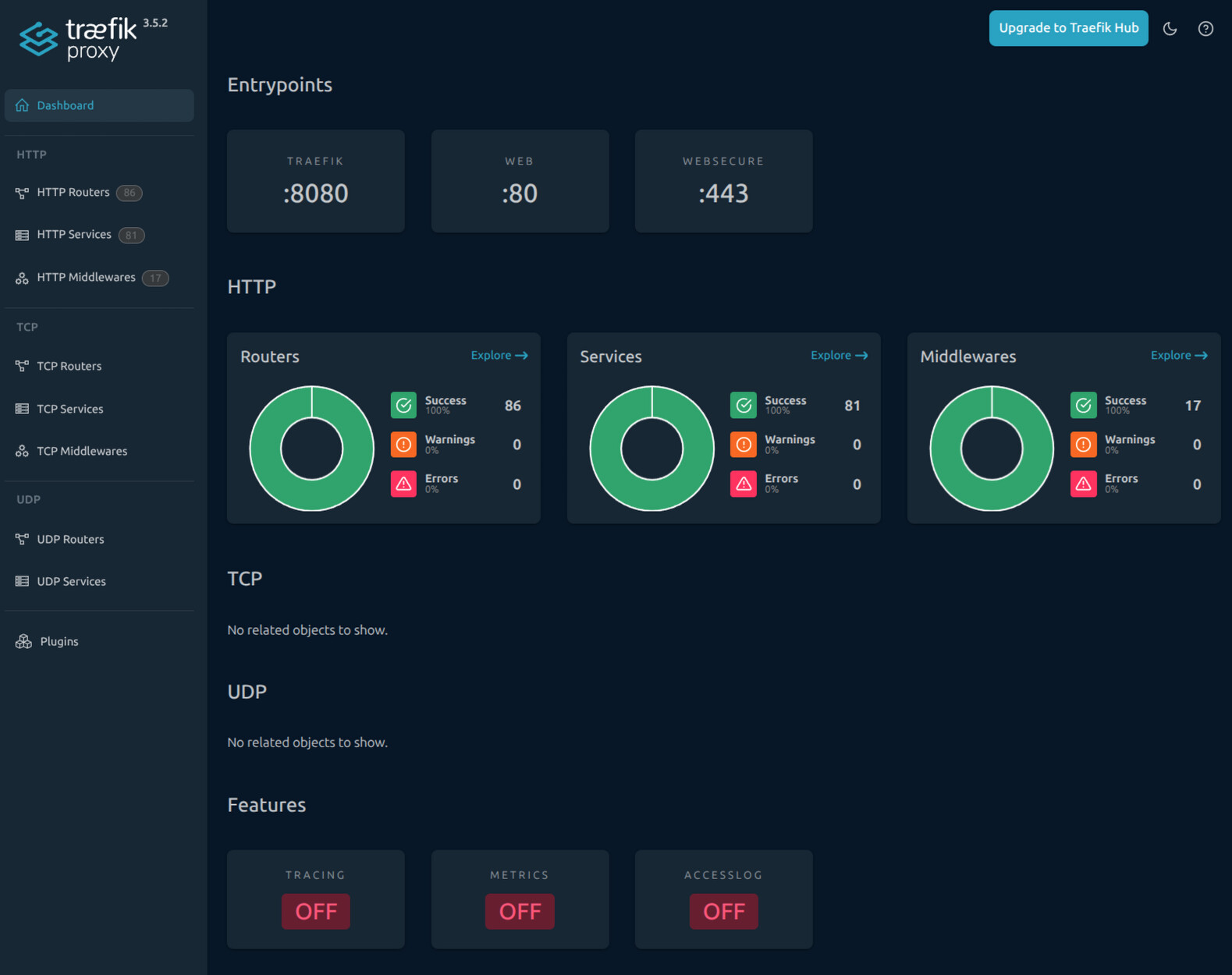
Это сервис дашборда трафика

В целом, слегка мусорно выгядят метки, я у себя в хомлабе смотрел на это дело, но

  1. у меня 32 контейнера с докером и прописывать 32 коннекта к трафику прям не охота + добавлять новый не уочень удобно
  2. меня тошнит от меток в таком формате

Вот дашборд трафика от автора

    - "traefik.enable=true" # Enable Traefik on this service
      - "traefik.http.routers.traefik.entrypoints=http" # Define HTTP entrypoint
      - "traefik.http.routers.traefik.rule=Host(`traefik.${domain}`)" # Host rule for routing
#      - "traefik.http.middlewares.traefik-auth.basicauth.users=Anchel:$$2y$$05$$GRm6cZXhGPl.HNyTrH//vOTsBU.bz/JvLh6Yae7oON4HPRRTNZ1ye" # Basic auth for security traefik for username/pass
      - "traefik.http.middlewares.traefik-https-redirect.redirectscheme.scheme=https" # Redirect HTTP to HTTPS
      - "traefik.http.middlewares.sslheader.headers.customrequestheaders.X-Forwarded-Proto=https" # Set forwarded headers for SSL
      - "traefik.http.routers.traefik.middlewares=traefik-https-redirect" # Apply HTTPS redirect middleware
      - "traefik.http.routers.traefik-secure.entrypoints=https" # Secure entrypoint for HTTPS
      - "traefik.http.routers.traefik-secure.rule=Host(`traefik.${domain}`)"  # Host rule for secure routing
#      - "traefik.http.routers.traefik-secure.middlewares=traefik-auth" # Apply authentication middleware
      - "traefik.http.routers.traefik-secure.tls=true" # Enable TLS for secure connection
      - "traefik.http.routers.traefik-secure.tls.certresolver=cloudflare" # Use Cloudflare for SSL certificate resolution
      # - "traefik.http.routers.traefik-secure.tls.certresolver=vultr"
      - "traefik.http.routers.traefik-secure.tls.domains[0].main=${domain}" # Main domain for SSL certificate
      - "traefik.http.routers.traefik-secure.tls.domains[0].sans=*.${domain}" # SANs for SSL certificate
      - "traefik.http.routers.traefik-secure.service=api@internal" # Internal service for Traefik API
#      - "traefik.http.routers.traefik-secure.middlewares=authelia@file"

А вот мой routers/traefik-router.yaml

---
rule: Host(`traefik.domain`)
entryPoints:
  - websecure
middlewares:
  - local-net-middleware
  - authentik-auth-middleware
service: api@internal

и routers/traefik-auth-router.yaml

---
rule: Host(`traefik.domain`) && PathPrefix(`/outpost.goauthentik.io/`)
entryPoints:
  - websecure
middlewares:
  - local-net-middleware
service: authentik-outpost-service

Что называется, почувствуй разницу
Второй файл используется для более качественного встраивания внешней аутентификации

Ну и дополнительно написал скрипт, который задает вопросы и генерирует нужные файлы + коммитит в гит

UPD.
А еще и нельзя использовать 1 трафик на несколько docker хостов, только если swarm или k8s разворачивать

1 лайк

Тоже тошнит от меток, лишняя куча бесполезного текста, глаза мозолит, но честно лень лезть в конфиг траефика, когда можно бездумно скопировать лейблы :sweat_smile: , конечно чтоб в конфиге это все прописать много труда не требуется, но даже vscode открывать очень лень

а что означают эти файлы

такой каждый файл лучше делать для каждого контейнера или поддомена, где какой-то сервис работает?

не пойму, у автора 2 типа файлов что ли?
в одном ямл разметка, в другом эти лейблы

потом

толком так и не нашел нормальный мануал, где что писать
где настройки чисто трафика и где потом делать настройки под каждый контейнер или сервер

В yaml конфиг самого трафика где указано использовать докер и его метки + базовые вещи типа портов, которые требуется слушать, обработчик ssl сертификатов.

Сюда же можно, но не нужно добавлять конфиги сервисов без автодискавери, лучше вынести в отдельный файл

Ну и после запуска трафик начинает сканировать метки сервисов и вытягивать из них конфигурацию, в этом случае сам трафик сконфигурировали 1 раз, а потом добавляем докер сервисы через compose файл и он сам подхватывает нужную конфигурацию

Я верхнеуровнево описывал свою конфигурацию тут, но суть сводится к тому, что я отказался от автодискавери и прописываю все конфиги трафика в 2 git репозиториях.

  1. Описание compose сервиса и основные конфиги - он деплоится на ноды при помощи komodo и требует остановки трафика
  2. Конфиги сервисов -при помощи CI/CD загружается в consul, а из него вытягивается traefik без остановки сервисов

Но можно упростить схему, что я и сделал в 1 версии

В моем случае 2,3 файла на сервис т.к. имена файлов имеют определенные названия, и участвуют в формировании итогового конфига, но можно делать на свое усмотрение

Напомню основные блоки конфигурации трафика.

  • listener - это единожды приписываемая сущность типа listen:port в nging
  • service - это то, куда приземлять трафик, например адрес конкретного сервиса
  • middleware - модификатор запроса или ответа, например, фильтр по IP, аутентификация, добавление заголовков
  • router - связывает домен и/или путь на конкретном листенере с добавлением конкретных мидлварок и с обработкой конкретным сервисом
1 лайк